AMS 2 Pro Not Loading Filament? What the LED Lights Mean and What to Check First
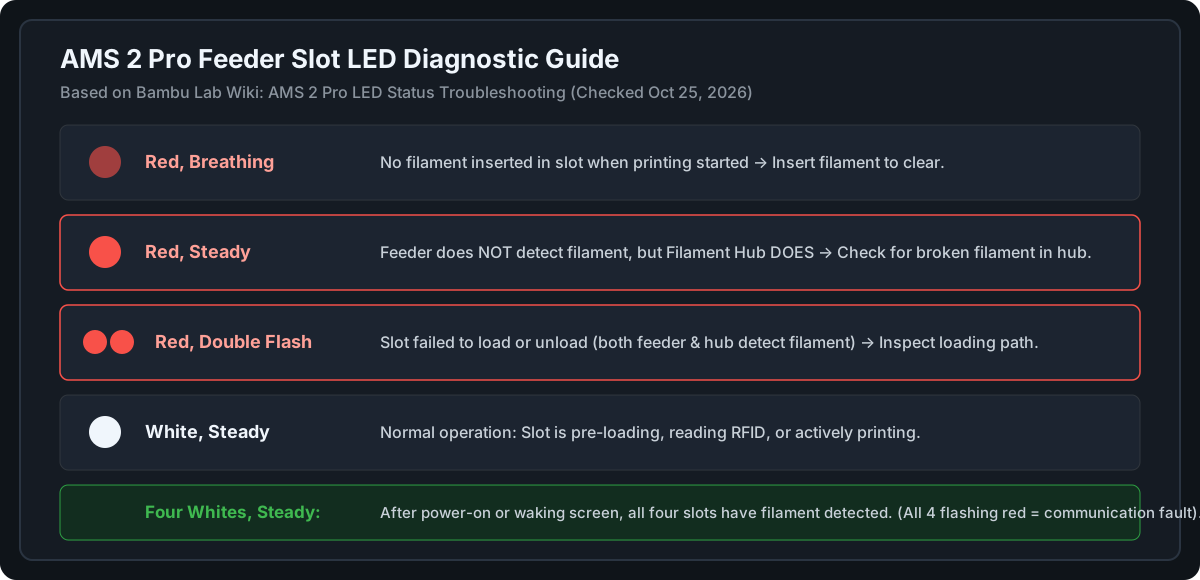
A steady red light means the hub, not the feeder, detects filament, and the filament may be broken inside the hub. Double flashing red means loading or unloading failed and both sensors see filament. Start by reading the LED pattern, then check the feeder and hub for filament pieces and contact Bambu support if the fault continues. Last checked October 25, 2026.
This guide summarizes Bambu Lab’s wiki as of October 25, 2026. It is a researched guide, not a repair log, so it does not claim any fix works on every unit.
First, load the filament the way Bambu describes
Lift the top cover, place the spool in the slot, push the grey feeder tab toward the rear, and insert the filament a few centimeters. The AMS 2 Pro should detect it and start pulling it in. Bambu filament is identified by RFID. For third-party filament, set the type and color in Bambu Studio.
What the LED lights mean
| LED | What Bambu says |
|---|---|
| Red, breathing | No filament was inserted in that slot when printing started. It returns to normal after you insert filament. |
| Red, steady | The feeder does not detect the filament, but the filament hub does. The filament may be broken inside the hub. |
| Red, double flash | The slot failed to load or unload. Both the feeder and the hub detect filament. Bambu says to analyze it together with the loading and unloading process. |
| White, steady | The slot is pre-loading, reading RFID or printing. |
| Four whites, steady | After power-on or waking the screen, all four slots have filament. |
Bambu’s page lists more states, including a single red flash. Check the wiki for the full table.
Checks from Bambu’s loading-failure page
This page covers the AMS generally. If pre-loading fails, it points to a few possibilities:
- The sensor is not detecting filament. The LED does not change when you insert it. Bambu suggests cleaning the Hall sensor and trying again.
- A loose motor wire or a faulty motor.
- A faulty gear. The motor shaft or gear turns, but the filament is not delivered.
For each, Bambu links its first-stage feeder troubleshooting page. Its AMS 2 Pro index also lists pages on cleaning the filament hub and on broken filament stuck in the unit.
Owner suggestions (not Bambu statements)
Owners on Bambu’s forum suggest checking for filament buildup around the feeder’s sensor lever and inside the hub when only one slot fails. Treat this as a lead to compare with the wiki, not an official fix.
When to stop
If the same slot keeps failing, or all four slots flash red (the wiki’s sign of a communication problem), contact Bambu support. Opening the unit can affect your warranty. For cable and setup checks, see the P1S installation guide.
What this guide does not cover
Spool jumping, roller lock and sticky rollers. I could not find an official Bambu fix for them, so I have not written one.